
Dental patient recall workflow chart
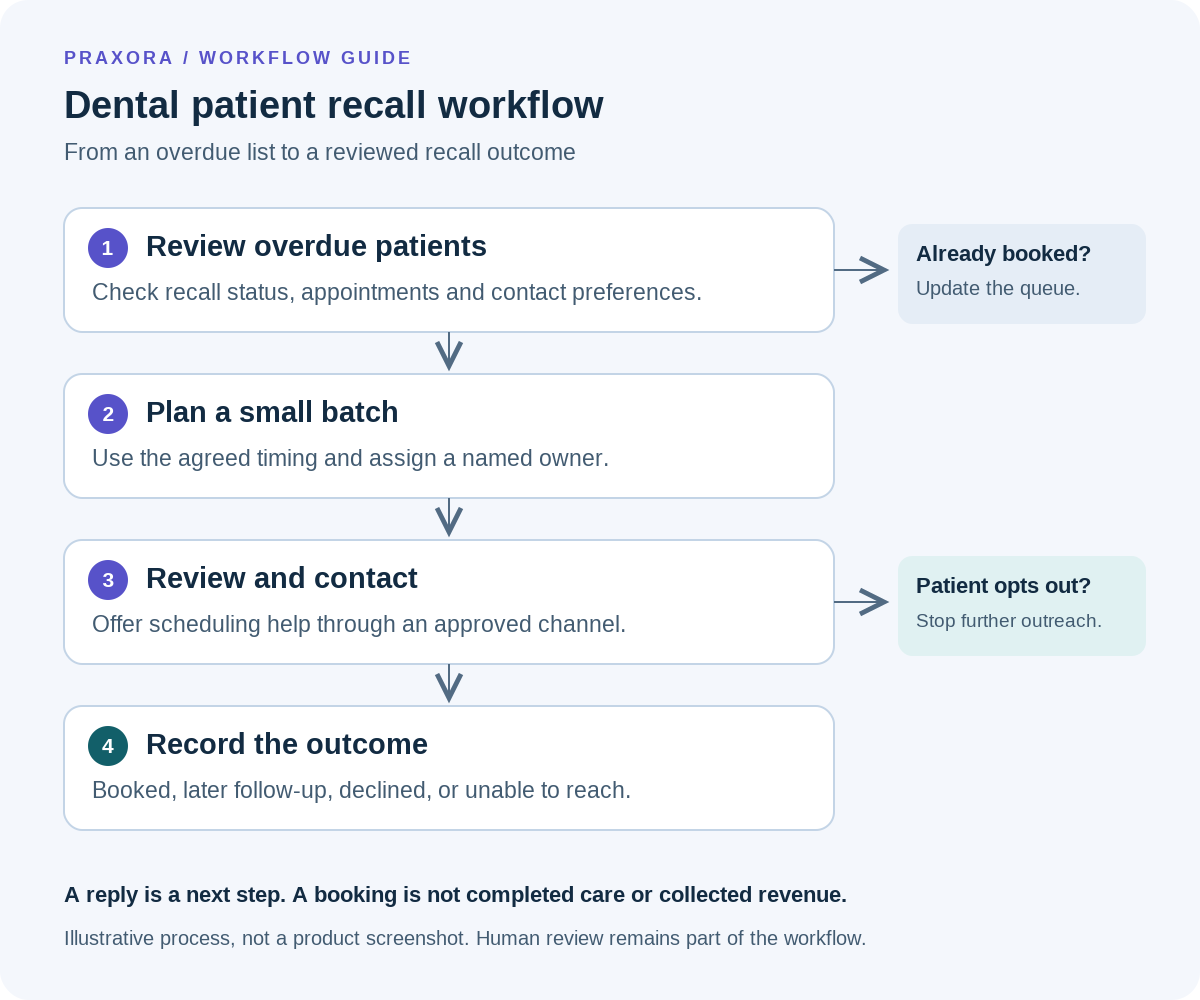
Recall brings back patients the practice already knows. The other workflows cover the rest of the schedule: missed calls, confirmations, unscheduled treatment, and openings.
Where the leak happens
- The overdue list is worked only when the schedule has a hole, so it is always last in line.
- The whole list is pulled at once, the front desk cannot finish it, and the same names come back next month.
- No one records why a patient has not returned, so every touch starts from scratch.
- Patients who are 6+ months overdue are treated the same as patients who are 2 weeks overdue — and neither group gets the right next step.
Recall does not fail because patients refuse to return. It fails because the list has no batches, no owner, and no outcome.
How Praxora works for recall
- Split the list into workable batches Overdue patients are grouped by how overdue they are — for example 1–3 months, then 3–6 months, then 6+ months — so the front desk starts with the batch most likely to return, not with the whole list.
- Give every case an owner and a next action Each case gets one named owner and one concrete step, such as offering two hygiene times. A case with no owner is how a list goes cold.
- Record the outcome and move on Rescheduled, still thinking with a new due date, unreachable, or declined — every outcome is recorded, so the next batch starts from what is actually still open.
That is the whole workflow: a case is captured, owned, worked to a recorded outcome, and only then closed. See also dental patient follow-up software and dental missed call recovery. Compare recall products on the follow-up software alternatives hub, and estimate overdue recall with the revenue leak calculator before you connect a PMS. The no-integration start is here.
What you get
- A recall list that shrinks because cases are closed, not because it was re-pulled.
- Hygiene production recovered from patients the practice already knows, instead of new-patient acquisition alone.
- A clear answer at the end of the month: how many overdue patients returned, and how many are still open.
The other workflows
Frequently asked questions
How overdue is too overdue to follow up?
There is no single cutoff. Patients who are recently overdue are usually the easiest to bring back, which is why batches start there — but older cases still get worked, in their own batch, rather than being dropped.
How often should recall follow-up happen?
There is no universal standard, and more messages are not better follow-up. The rule that matters is the same as for every workflow: every touch ends with a recorded outcome and a next date, or the case is closed.
What if a patient does not want to return?
Then the case is recorded as declined and closed. A closed case is a result, not a failure — it stops the same patient from being contacted again as if nothing had happened.
See what it is worth
Use the dental revenue leak calculator to estimate what this workflow is worth for a practice like yours, from aggregate figures — no patient-level data needed to get an estimate.